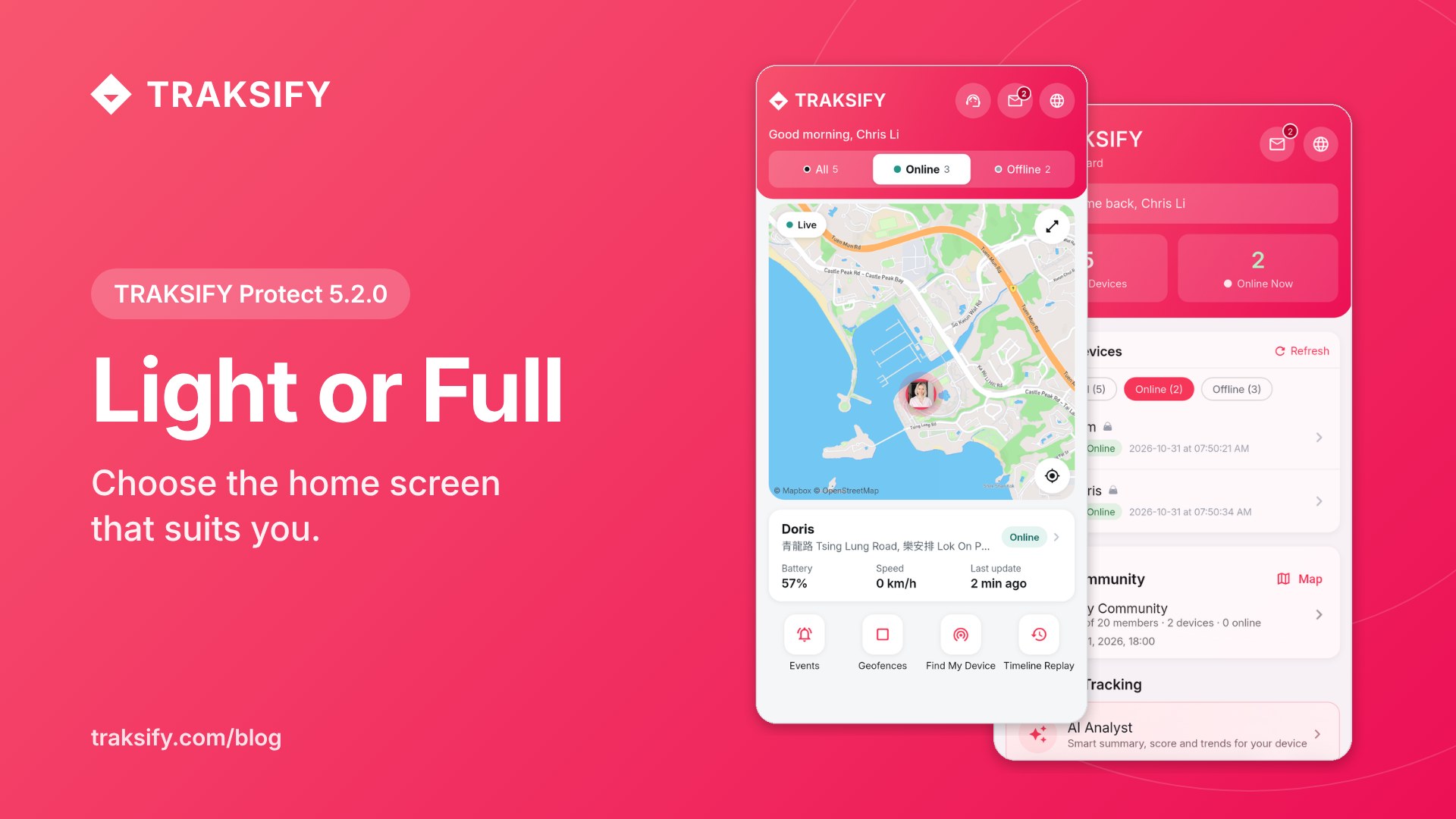
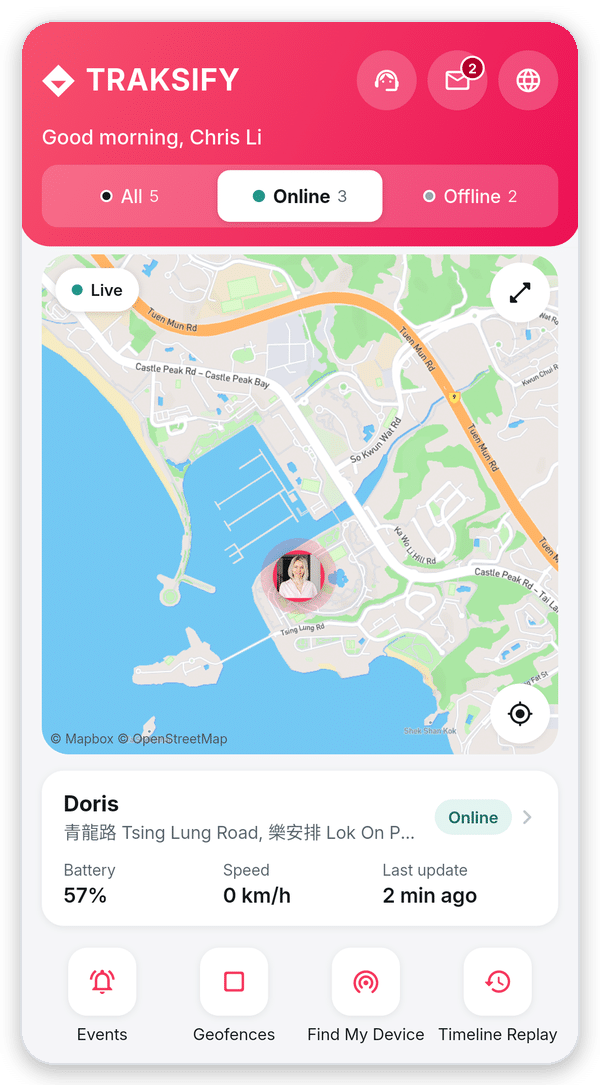
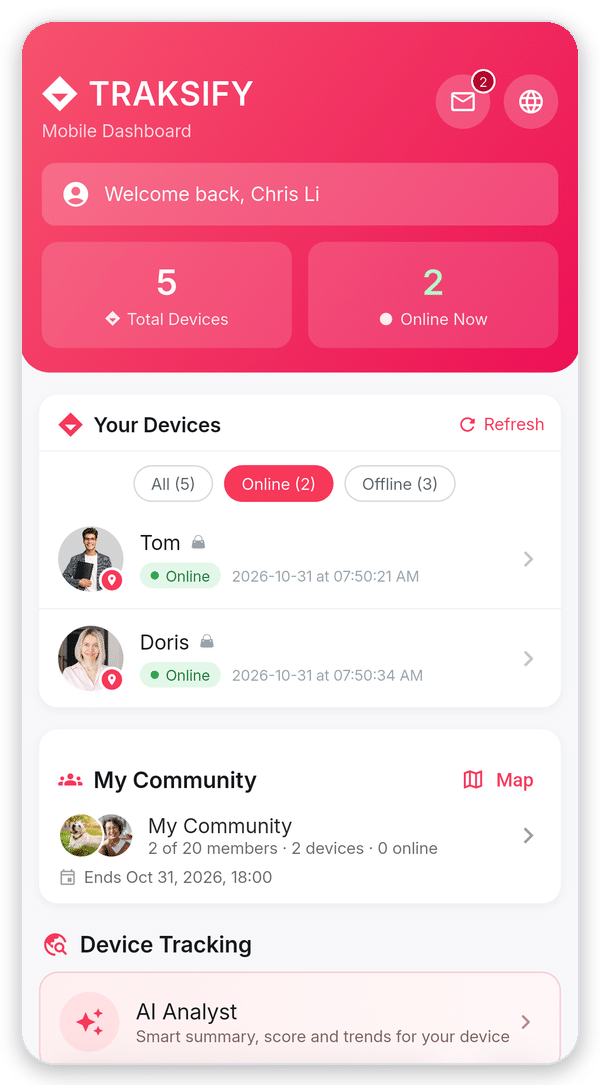
TRAKSIFY Protect 5.2.0 gives you a choice of home screen. The new Light dashboard shows your devices, a live map and the essentials on one calm screen. The Full dashboard you know is still there, with every tool and statistic. You choose, and you can switch at any time.
Why a Light dashboard?
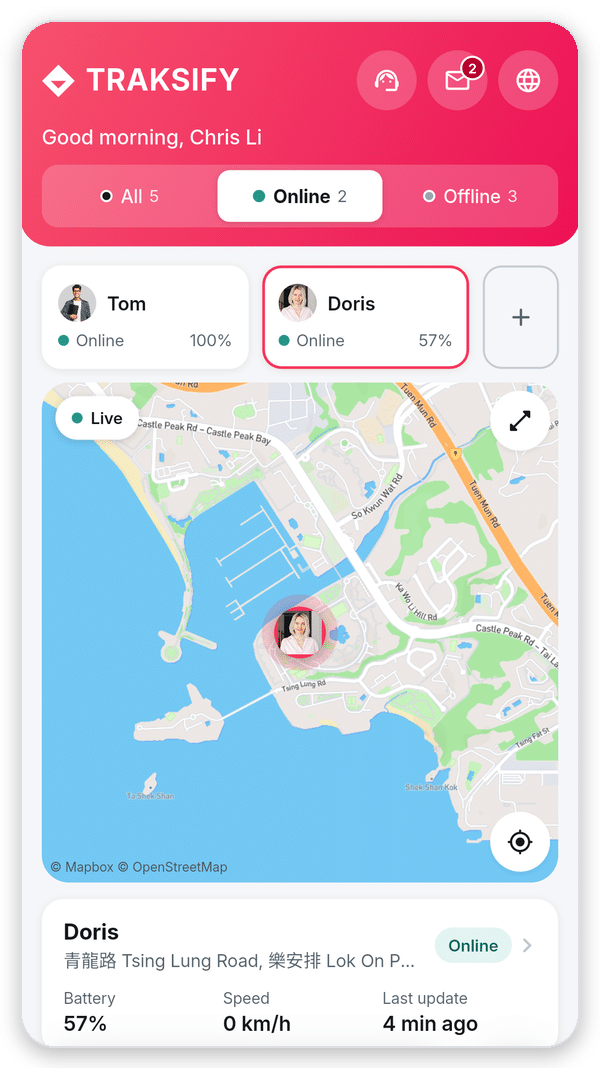
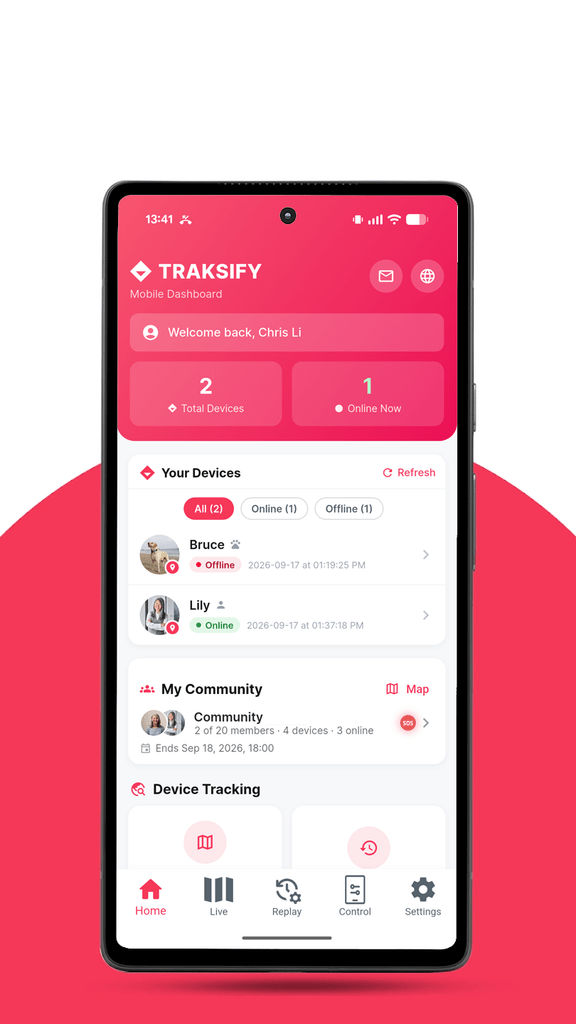
See what matters at a glance. Where your devices are, whether they are online and how much battery they have, without scrolling.
The map comes first. Tap a device in the row at the top and the map moves straight to it. An offline device shows its last known position.
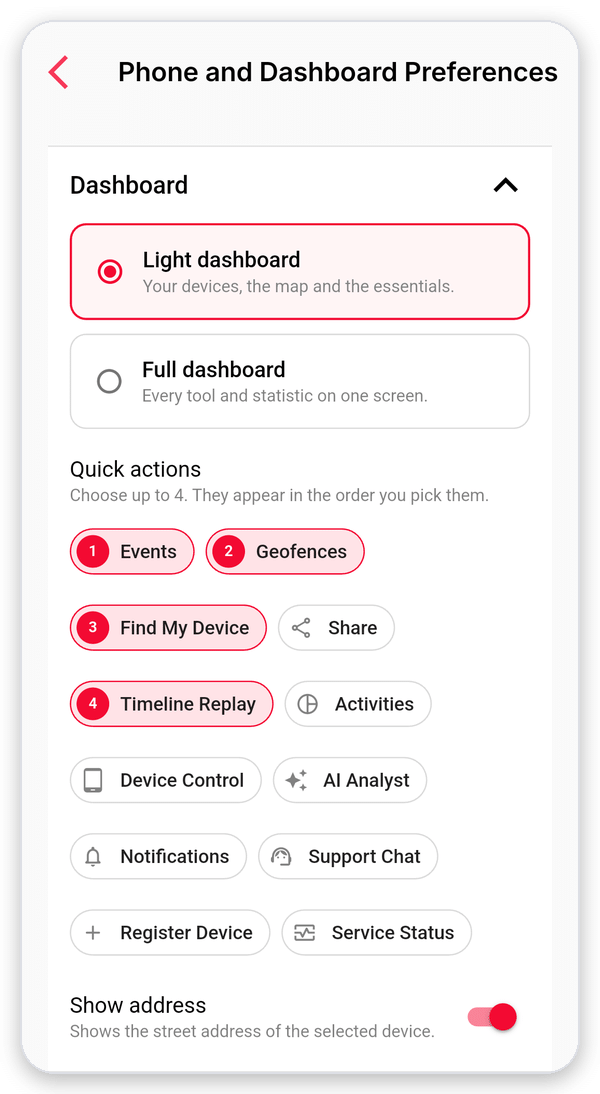
Your own shortcuts. Pick up to four quick actions, such as Events, Geofences, Find My Device or Share.
Help is one tap away. Support chat, messages and language sit right in the header.
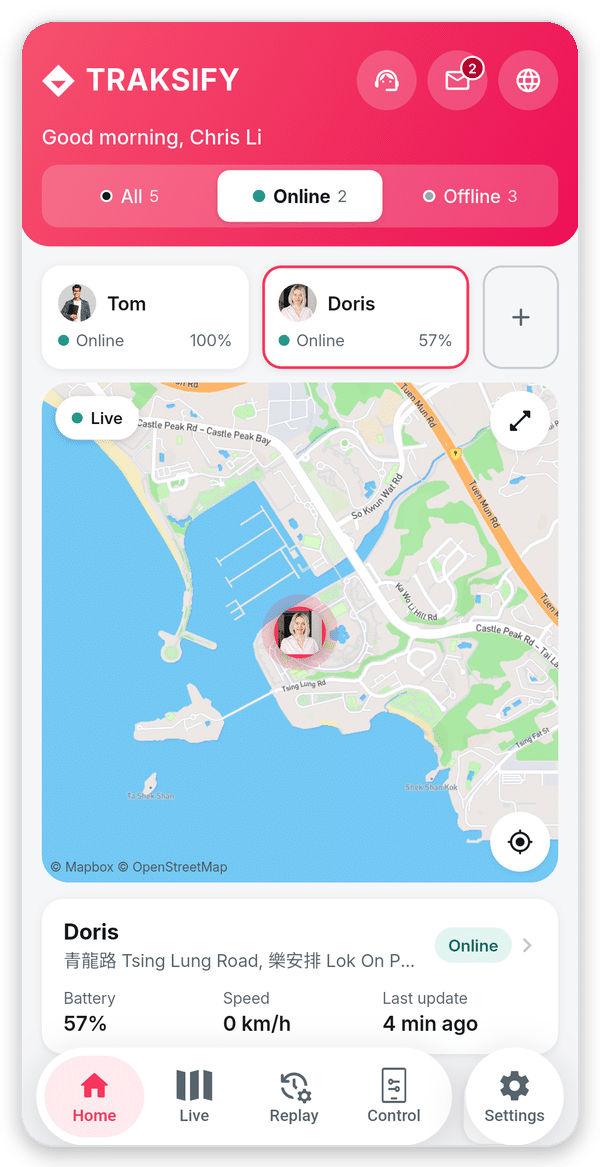
More room to see. The bottom menu slides away while you scroll and comes back when you scroll up.
The new Light dashboard.
How to switch between Light and Full
Step 1: Open Settings
Tap the round Settings button at the bottom right of the app. If the menu is hidden, scroll up a little and it slides back in.
Tap Settings.
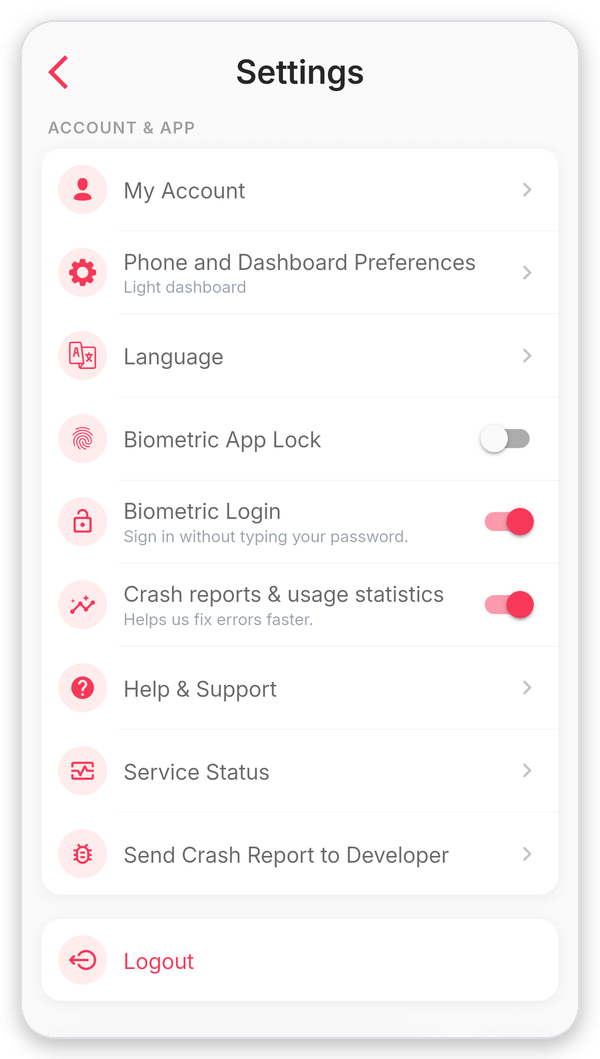
Step 2: Open Phone and Dashboard Preferences
Under Account & App, tap Phone and Dashboard Preferences. The line below it shows which dashboard you are using now.
Tap Phone and Dashboard Preferences.
Step 3: Choose Light or Full
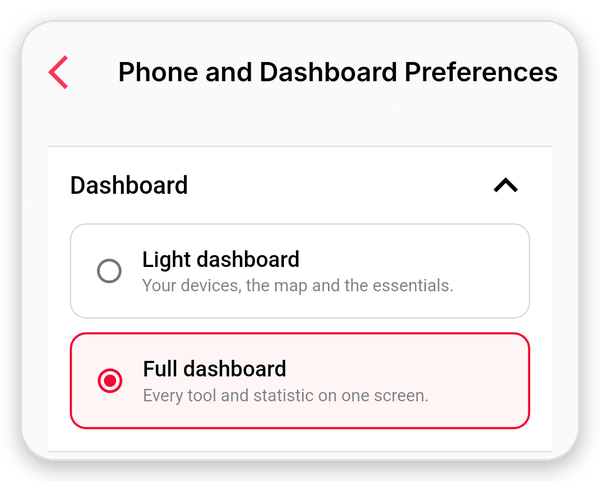
At the top, under Dashboard, tap Light dashboard or Full dashboard. A green message confirms the change. Your choice is saved immediately, so there is no need to press Save.
Choose Light or Full.
Step 4: Pick your quick actions (Light only)
With Light selected, choose up to four quick actions. The numbers show the order in which they appear on your home screen. Below them, turn Show address on or off for the status card.
Up to four quick actions.
Step 5: Go back to Home
Tap Home in the bottom menu. Your new dashboard is ready. To change back, simply repeat steps 1 to 3.
Light dashboard
Full dashboard
Good to know
If you already used TRAKSIFY Protect before 5.2.0, you keep the Full dashboard. New users start with Light.
Your choice is saved on your phone. If you use TRAKSIFY on more than one phone, choose on each of them.
Both dashboards show the same devices and update automatically every 30 seconds. Nothing changes for your alerts, geofences or reports.
Press and hold a device in the Light dashboard to open its profile. Tapping the status card does the same.
Share Now or Share Together? Two Ways to Keep Your Dog Safe
TRAKSIFY Protect gives you two very different ways to let other people see your dog’s location — and knowing which one to reach for makes all the difference. One is built for a single person, for a little while. The other is built for a group, for a shared outing. Here is when to use each, exactly how to set them up, and how both can help you avoid a lost dog in the first place — or get one back quickly if the worst happens.
Use case 1 — “Single Device” share: one person, for a limited time
The scenario: You’re heading out for the day and a friend, neighbour or domestic helper is looking after your dog at home. You want them to be able to see where your dog is — for example if the dog slips out of the garden while being walked — but only for today, and only that one person. You don’t want to add them to anything permanent, and you don’t want to hand over your account.
This is exactly what Single Device sharing is for. You share one device with one person, and you decide how long the share lasts — a few hours, a day, a week. When the time is up, access ends automatically. You can also stop it yourself at any moment. It is the digital equivalent of lending a spare key for the afternoon and having it disappear from their pocket at midnight.
Why it helps prevent a lost dog: the person on the ground can open the live map the instant something feels off — the dog isn’t back from the garden, the front door was left open — instead of calling you and waiting. Minutes matter. And if the dog does go missing, your helper can follow the tracker’s live position and last-known location directly, and share exactly where they’ve searched, all without ever needing access to your full account.
How to share a single device
Open TRAKSIFY Protect and go to the device you want to share.
Tap Share, then choose how long the share should last (for example “1 day”).
If the other person is with you, let them scan the QR code straight from your screen. If they’re elsewhere, tap Send by email and enter their address — they’ll receive an invitation with a QR code and a link.
They open the invitation in the free TRAKSIFY Protect app, tap Confirm, and enter the one-time code (you receive it by email and push, and pass it to them). This last step confirms you approved the share.
Done. They now see your dog on their map until the time you set runs out — or until you stop the share.
The whole thing takes under a minute, and nothing is left switched on afterwards.
Use case 2 — “Private Community”: a group, on a shared outing
The scenario: Five dog owners meet for a Sunday walk along the beach or through the woods. The dogs run ahead, double back, disappear behind a dune, chase a scent into the trees. Everyone is loosely watching everyone else’s dog, but nobody can see them all. This is where a single one-to-one share falls short — you’d need ten separate shares, and still no one would have the full picture.
A Private Community solves this. Everyone joins one temporary, invitation-only group and shares their dog on one shared live map. Every member sees every dog at once. And because the group knows it’s a walk, not a permanent arrangement, the community can be set to end automatically when the outing is over.
Why it helps prevent a lost dog: the community doesn’t just show positions — it watches the group for you. If one dog drifts too far from the others, members get a separation alert. If a tracker raises an SOS or fall alarm, everyone in the group is notified, not just the owner who might be a hundred metres away and out of earshot. So the moment a dog strays toward a road or vanishes over a ridge, the nearest person — not just the owner — knows immediately and can react. That head start is often the difference between “we caught up with him” and “he was gone before we noticed.”
How to set up a Private Community for a walk
In Settings → Community, tap Create and give it a name (for example “Sunday Beach Walk”).
Set an end date/time so the community closes itself when the walk is done, and add the devices you want to share.
Tap Invite and send an invitation to each owner by email. They accept in their own app and choose which of their devices to share.
Everyone opens the Community map — all the dogs appear together, live.
Enjoy the walk. Proximity and separation alerts, plus any SOS or fall alarms, are shared across the whole group automatically. Each owner can pause their own sharing at any time, and the community closes on its own at the end.
Which one should I choose?
One person watching your dog while you’re away — a helper, a neighbour, a dog sitter — for a set period → Single Device share.
A group out together — a walk, a hike, a day at the beach — where everyone should see every dog and be warned if one wanders → Private Community.
A simple way to remember it: share a device when you’re handing responsibility to one person for a while; create a community when you’re sharing responsibility with a group for an outing.
Both are private, temporary, and in your control
Whichever you choose, the same principles apply: you decide who sees your dog, you decide for how long, access ends by itself, and you can stop it at any time. Nothing stays switched on in the background, and no one ever gets your account. That’s tracking to protect — never to stalk — and it’s what turns a nerve-wracking “where’s the dog?” moment into a quick glance at a map.
You’ll need the free TRAKSIFY Protect app and a TRAKSIFY tracker. Don’t have one yet? Get the PACK.
Version 3.9.0 is rolling out now on the App Store and Google Play. It’s a release about context: understanding what a tracker did over a whole week rather than a single day, sharing a device with exactly the right people in exactly the right way, and making sure the app speaks to you clearly wherever you are.
What’s new in 3.9.0
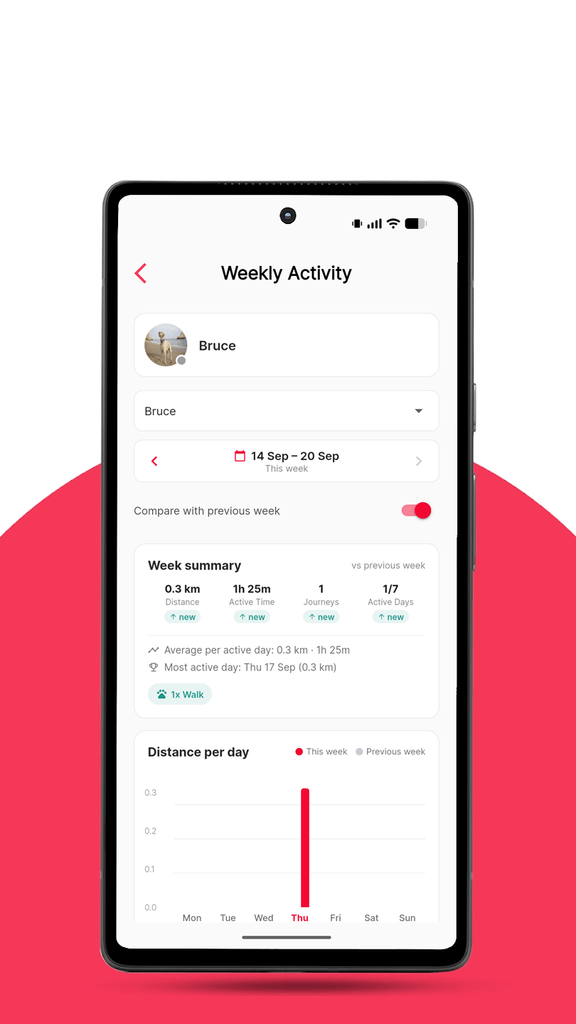
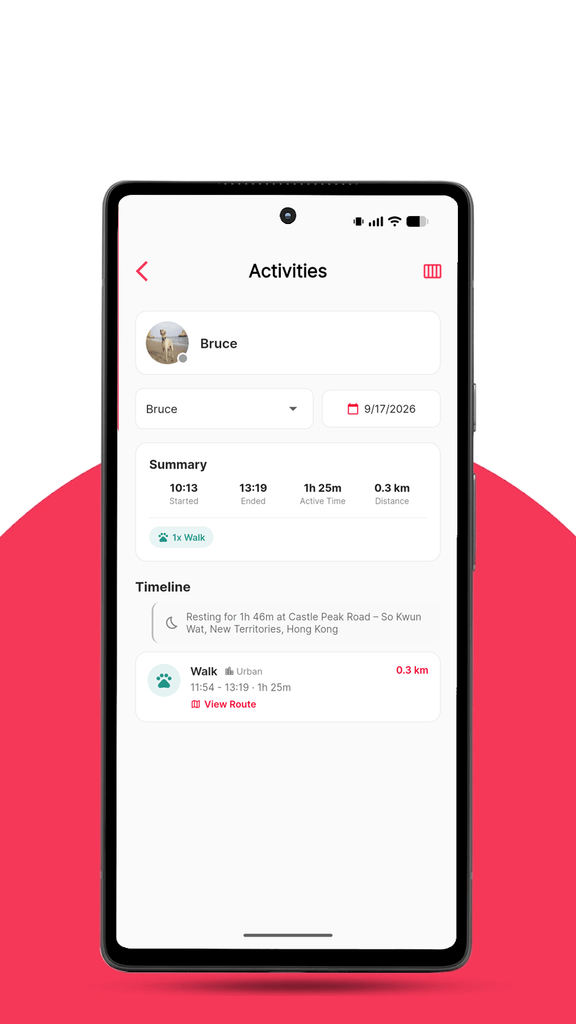
Weekly Activity report — a seven-day view of distance, active time, journeys and active days, with automatic comparison to the previous week.
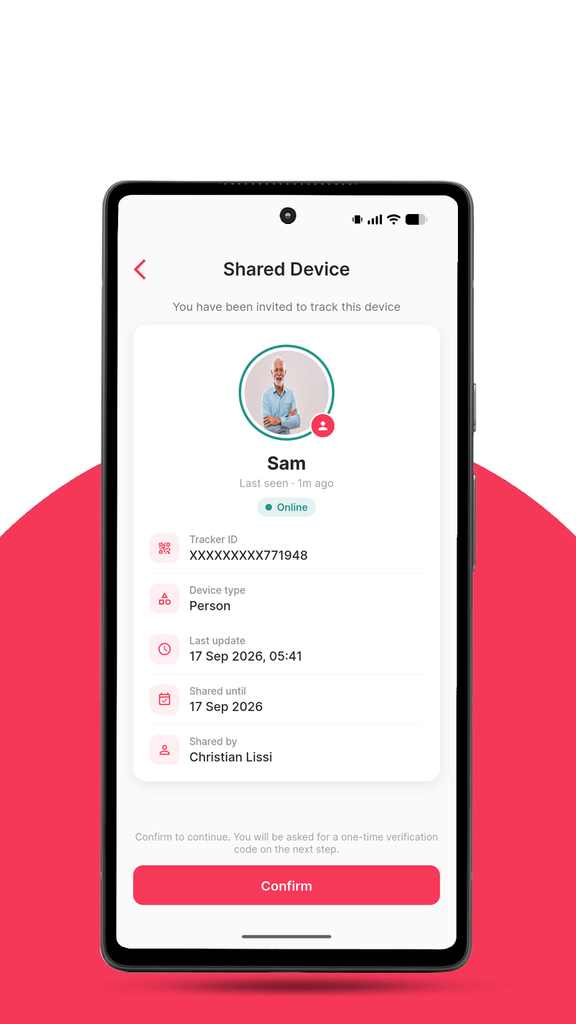
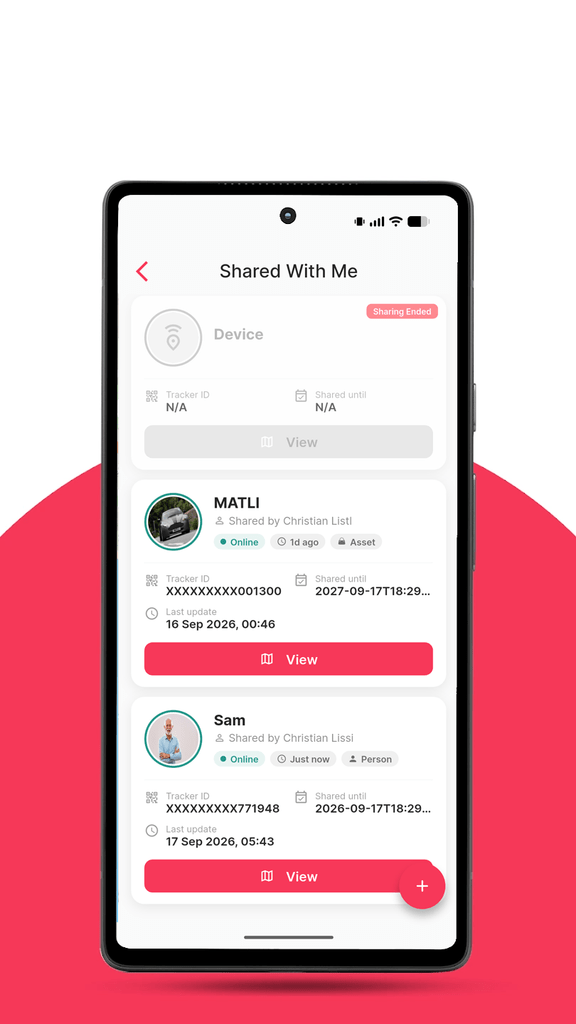
Redesigned device sharing — the screens for accepting and viewing a shared device now show the owner’s alias, photo, device type, online status, last update, the sharing period and who shared it.
Sharing clean-up — unsharing a device now removes it from both sides immediately; no more “sharing ended” cards lingering in your list, and no more being logged out when you unshare.
Live translations — corrections and additions to any of the six app languages now reach you automatically, without waiting for an app update.
Event names, always readable — every device event and alarm type can report now has a proper name in every language, and anything new is displayed cleanly rather than as a raw code.
Stability — fixed the shared-device map failing to load on Android and showing an error on iOS.
Your week at a glance
Until now, the Activities screen showed one day at a time. That’s ideal for answering “where did Bruce go on Tuesday?” — less so for “is he getting enough exercise?” or “how much did I drive this week?”
The new Weekly Activity report answers those questions directly. Pick a device and a week and you’ll see:
Distance, Active Time, Journeys and Active Days for the week as a whole.
Week-on-week comparison — each figure carries an up/down badge against the previous week, so a quieter or busier week stands out immediately.
A day-by-day breakdown — the average per active day, the most active day, and a bar for each day. Tap any day to open the familiar daily view.
Profile-aware wording — a pet’s week reads “Walk” and “In a vehicle”; a vehicle’s week reads “Driving”. The categories match your device’s profile, exactly as on the daily screen.
The numbers are calculated with the same method as the daily screen, so a week here is precisely the sum of its days — no surprises when you drill down. Weeks run Monday to Sunday in your local time zone.
Sharing a device vs. joining a Private Community
TRAKSIFY Protect now offers two ways to let other people see a tracker, and they’re designed for different situations. Here’s how to choose.
Shared Device is for lending one tracker’s location to one person for a limited time. You choose the device, set an expiry date, and hand over a QR code or link. The other person scans it, confirms with a one-time code, and sees that device — and only that device — on their map until the share expires or you revoke it. Think: your dog-sitter for the weekend, a friend borrowing the car, a colleague tracking a delivery.
Private Community is for a group that tracks together, on an ongoing basis. A family, a walking group, a small fleet team. Members join the community once and can then see each other’s devices on a shared map, receive each other’s SOS and fall alarms, message one another, and pause their own sharing whenever they want privacy. Membership is managed by the community owner, ownership can be transferred, and everyone keeps control of what they contribute.
In short:
Shared Device
Private Community
Who sees it
One person
All members
What they see
One device
Everyone’s devices
How long
Until the expiry date you set
Until they leave or are removed
Alarms
No
SOS and fall alarms relayed to members
Messaging
No
Yes, between members
Best for
Temporary, one-off access
An ongoing group
Both are available from the app’s main menu, and a device can be in a community and shared individually at the same time.
The new “Shared Device” accept screen: photo, alias, online badge, tracker ID, device type, Shared until, Shared by, Confirm button
“Shared With Me” with two cards from different owners, showing owner name and device photo
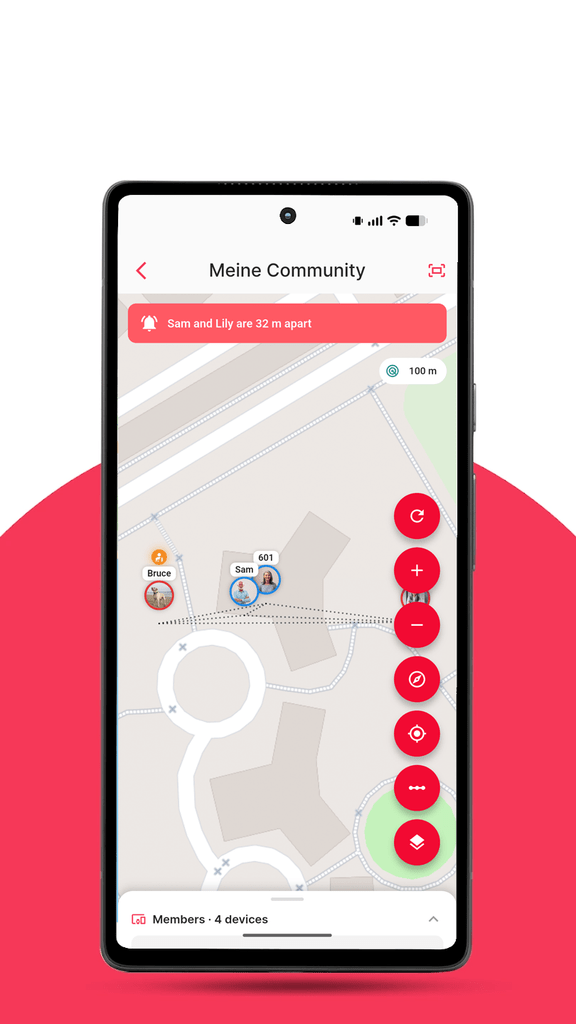
Private Community map with several members’ devices visible
Translations that improve without an update
TRAKSIFY Protect is available in English, German, French, Spanish, Simplified Chinese and Traditional Chinese. Keeping six languages perfect across hundreds of screens is a never-ending job, and until now every correction — even a single word — meant waiting for the next app release.
From 3.9.0, that’s no longer the case. The app now checks for updated translations each time it starts and applies them straight away. If you spot a missing or awkward translation, tell us and it can be fixed the same day, for everyone, without an app update.
This also lays the groundwork for adding further languages down the line. If there’s a language you’d like to see, let us know.
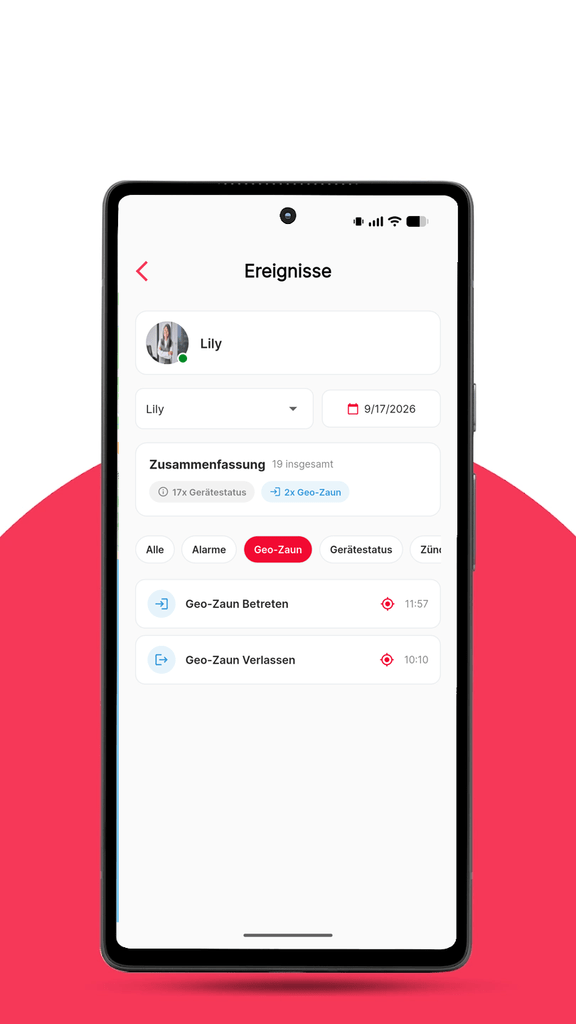
Events screen in German
Also in this release
Unsharing a device as the owner no longer signs you out of the app.
Devices you’ve unshared disappear from the recipient’s list straight away.
Fixed the shared-device map loading endlessly on Android, and an error message on iOS when opening a shared device.
Device events now use the correct icons for stopped, inactive, overspeed, fuel and maintenance events.
Update now
Version 3.9.0 is available today. Open the App Store or Google Play and update TRAKSIFY Protect to get started — your existing devices, communities and shares carry over unchanged.
As always, we’d love to hear what you think. Reach us through the app or at the usual support channels.
Version 3.9.0 (build 138). Requires iOS 15 / Android 8 or later.
The Pack That Looks After Itself: How Dog Owners Are Taking Care of Each Other’s Dogs
Every dog owner knows the moment. You look up from a conversation at the park, and the space where your dog was a second ago is empty. A rustle in the bushes, a squirrel, a scent worth following, and your best friend is off on an adventure you were not invited to. The next few minutes feel like hours.
A group of dog owners in a hillside neighbourhood knows that moment too well. They meet most mornings on the same trail: a corgi named Bruce, a retired greyhound, two spaniels who behave as one, and a young shepherd still learning where the path ends. Their owners had chatted for years but never really organised themselves. If one of them was away, their dog stayed home, and if a dog wandered off, everyone just started shouting its name in different directions.
That changed when one of them created a Private Community in TRAKSIFY Protect and simply invited the others by email. Within a day, five dogs were on one shared map. Each owner chose which of their trackers to share, and from then on every walk had a quiet safety net underneath it. Nobody had to ask “where is Bruce?” – a glance at the phone answered it.
The first real test came on a foggy Saturday. The shepherd, still a puppy at heart, slipped away after a rabbit. Before his owner had even noticed, her phone buzzed with a separation alert: her dog was now more than three hundred metres from every other dog in the group. She opened the map, saw exactly where he was heading, and the owner of the greyhound – who happened to be on that side of the hill – simply walked over and picked him up. Ten minutes, no shouting, no panic.
Soon the group discovered the community was good for more than emergencies. When one owner had to travel for a week, she did not need to find a kennel. Her spaniels stayed with a neighbour from the group, and because they were still on the shared map, she could see them on their morning walk from three time zones away. A short message to the group – “Back Friday, thank you all” – reached every phone as a push notification. The dogs, of course, were unbothered by the arrangement.
What makes this work is not the technology alone. It is that the group set its own rules – written into the community itself, visible to every member – and that everyone can see the same thing at the same time. Whoever is closest helps. Whoever has an hour to spare walks two dogs instead of one. The tracker on the collar turns a loose circle of acquaintances into a pack that looks after itself.
And when the owners decided to pause their morning walks over the summer, the organiser simply set an end date. The community reminded everyone the day before, closed itself on time, and location sharing stopped. When autumn came, a new one was created in under a minute.
The TRAKSIFY Protect Community Edition is one of its kind: protection for groups, organised in secure, private and easy-to-manage communities. Only people you invite can join. Each member decides which devices to share and can pause at any moment. Proximity, separation, SOS and fall alerts reach the whole group, and every community ends when the activity does. Whether it is dog owners on a trail, a family on holiday, a class on an excursion or friends on a hike, the group protects itself – together.
Ready to bring your own pack together? Read the full guide to the TRAKSIFY Protect Community Edition and create your first Private Community from the app today.